
NVIDIA Aerial L1 + xFAPI + OAI L2
This guide covers pairing OAI L2 (MAC and above) with NVIDIA Aerial (L1/PHY) across the FAPI L2-L1 boundary, using xFAPI as the translator-bridge in its AERIAL_OAI mode.
Before you start: this guide assumes NVIDIA Aerial L1 is already installed and running. See Installing NVIDIA Aerial L1 for the Aerial build and bring-up.
This guide covers pairing OAI L2 (MAC and above) with NVIDIA Aerial (L1/PHY) across the FAPI L2-L1 boundary, using xFAPI as the translator-bridge in its AERIAL_OAI mode.
Aerial exposes SCF FAPI over nvIPC shared memory; xFAPI translates SCF FAPI to classic nFAPI and bridges it to OAI over sockets (P5 over SCTP, P7 over UDP). xFAPI is the nFAPI PNF; OAI runs its MAC as the nFAPI VNF.
The deployment is disaggregated across two hosts: NVIDIA Aerial L1 + xFAPI on one server, and OAI L2 (VNF) on a second COTS server, joined by the nFAPI (SCTP/UDP) link.
For the Aerial-to-OCUDU split and the OAI-L1 variant, see the References.
Highlights
- OAI L2 (
nr-softmodemin VNF mode) runs behind NVIDIA Aerial as the PHY. - nvIPC to nFAPI translation in xFAPI (AERIAL_OAI mode): nvIPC secondary on the Aerial side, nFAPI PNF on the OAI side.
- Disaggregated two-host topology: Aerial L1 + xFAPI on Host A (GB10), OAI L2 on Host B (COTS), joined by an nFAPI (SCTP/UDP) link.
- No DPDK / xSM in this mode; the OAI side is classic nFAPI over sockets.
1. System Under Test
Validated with NVIDIA Aerial + xFAPI on a Tyrone Spark (NVIDIA GB10) host and OAI L2 on a COTS x86-64 server.
| Item | Host A (Aerial + xFAPI) | Host B (OAI L2) |
|---|---|---|
| Platform | Tyrone Spark (NVIDIA GB10) | COTS server |
| CPU | aarch64, isolated cores | x86-64, isolated cores |
| GPU | NVIDIA GB10 (Aerial cuPHY) | - |
| NIC | ConnectX-7 (fronthaul to O-RU) + link to Host B | NIC for the nFAPI link to Host A |
| Fronthaul | O-RU (e.g. LiteON RU) | - |
| Sync | PTP grandmaster / GNSS | - |
| OS | Ubuntu 22.04 | Ubuntu 22.04 |
Single-host is also possible (Aerial + xFAPI + OAI on one box); set the nFAPI endpoints to 127.0.0.1 (see §6.3).
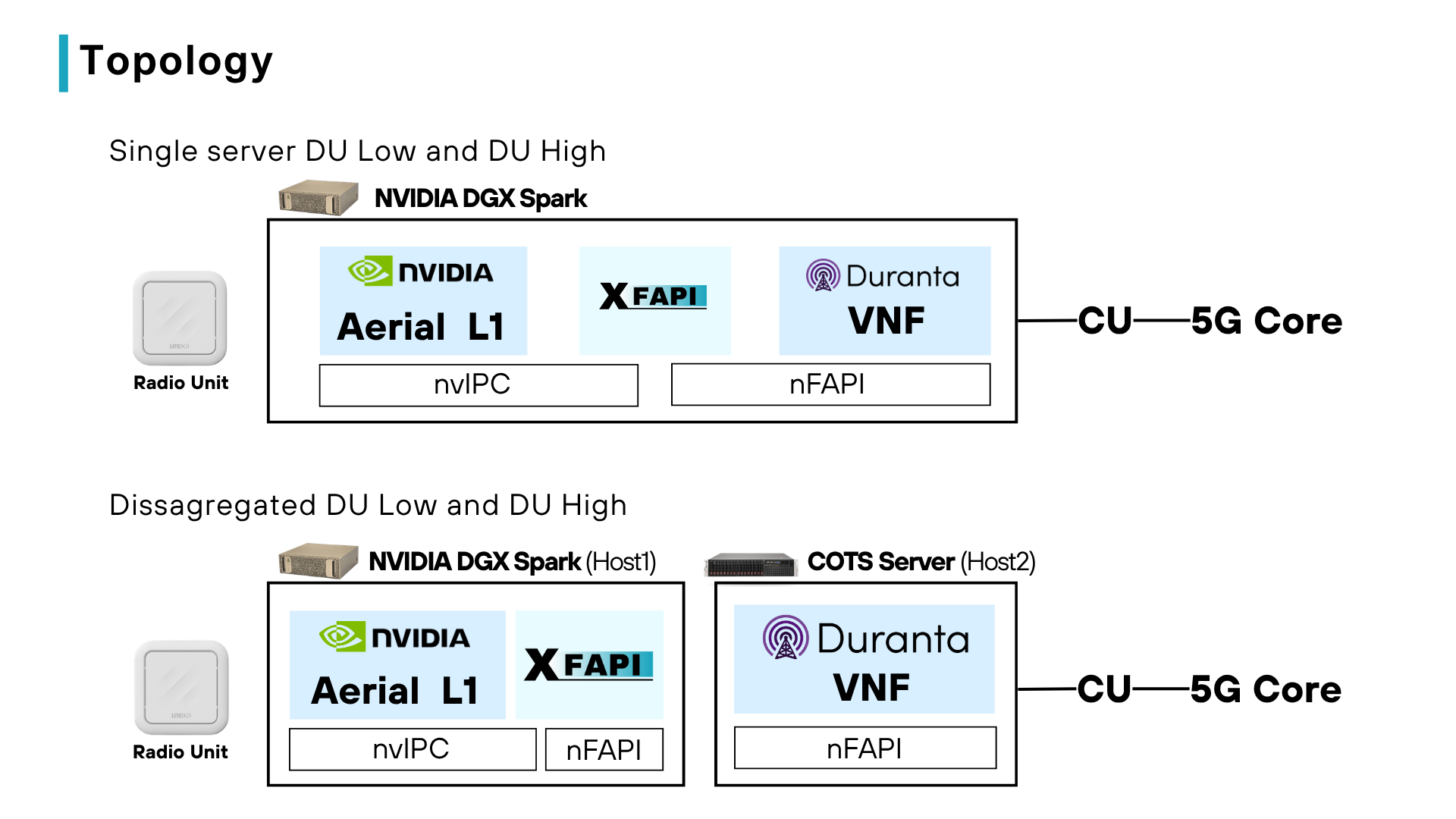
2. Architecture Overview
Aerial owns the PHY and RU; OAI owns MAC and above. The FAPI message set is the contract between them; nvIPC is the transport on the Aerial side and nFAPI on the OAI side.
   Host A                                         Host B
   NVIDIA Aerial L1     xFAPI (AERIAL_OAI)        OAI L2
   cuPHY / SCF FAPI <--nvIPC--> nvIPC<->nFAPI <--SCTP P5 / UDP P7--> nr-softmodem (VNF)
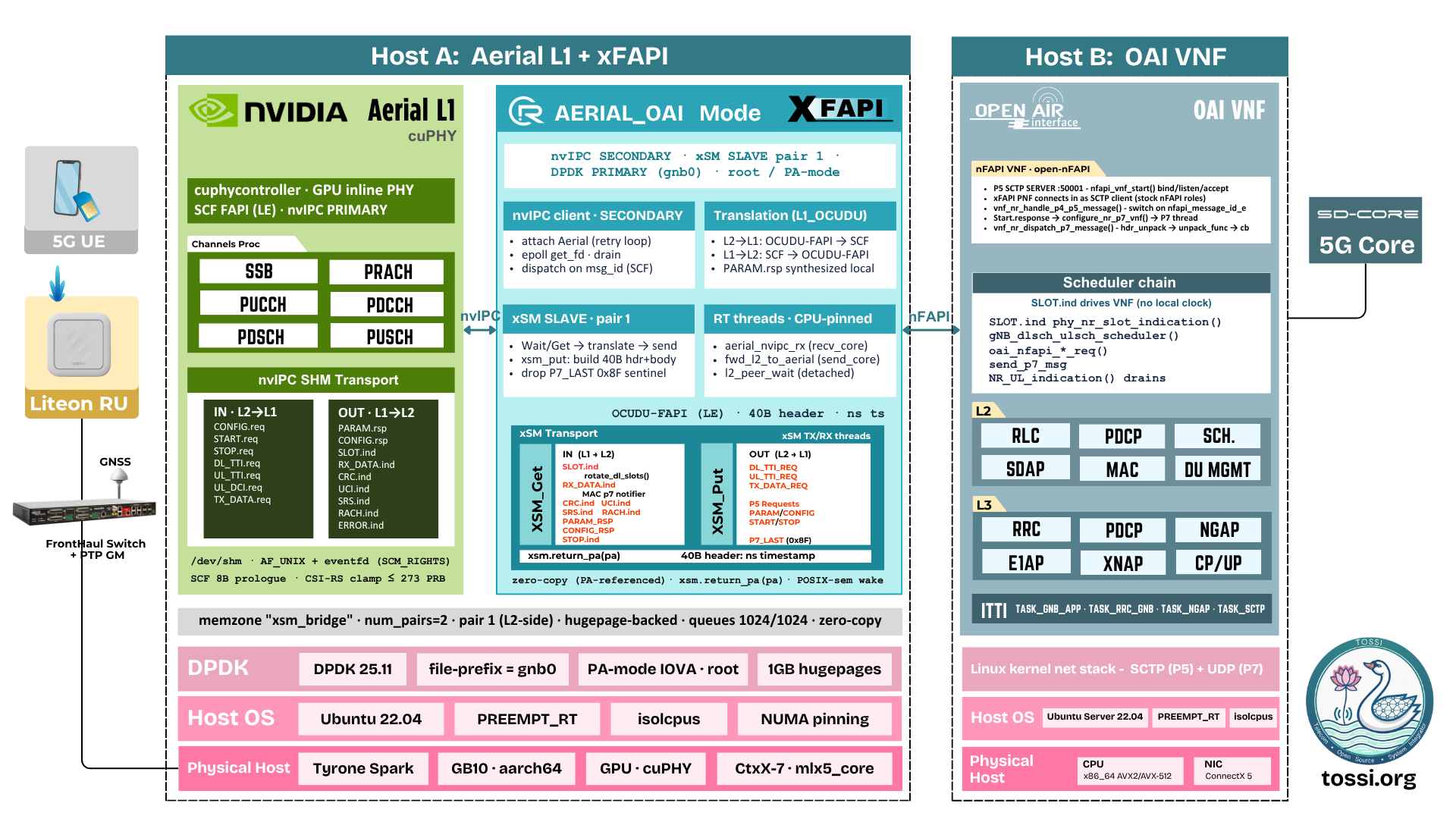
- Aerial side: xFAPI is the nvIPC secondary; Aerial cuphycontroller is the nvIPC primary that creates the SHM pools.
- OAI side: OAI's nFAPI VNF is the SCTP server; xFAPI (the nFAPI PNF) connects out to it. P5 is SCTP, P7 is UDP.
3. Clone the repositories
Pick a common workspace, e.g. ~/tossi-ran:
mkdir -p ~/tossi-ran && cd ~/tossi-ran

# xFAPI bridge (on Host A)
git clone https://github.com/coranlabs/xFAPI

# OAI L2 - develop branch (on Host B)
git clone https://github.com/TOSSI-Foundation/OAI-RAN
cd OAI-RAN && git checkout develop && cd ..
4. Build & Run xFAPI (AERIAL_OAI) - Host A
The xFAPI side (prerequisites, syncing the nFAPI sources, packing and building the nvIPC library from the Aerial container, and building xFAPI in aerial_oai mode) is documented in full in the xFAPI repository. The detailed steps below mirror that document:
docs/build_and_run_aerial_oai.md
Prerequisites
sudo apt update
sudo apt install -y build-essential cmake pkg-config \
                    libyaml-dev zlib1g-dev libsctp-dev
Sync the OAI nFAPI sources
Mirror the OAI nFAPI sources into src/ipc/nfapi:
./sync_nfapi.sh /path/to/openairinterface
# or: OAI_DIR=/path/to/openairinterface ./sync_nfapi.sh
-n for a dry run, -v for verbose, -h/--help for usage.
Get the nvIPC sources into the tree
The nvIPC source is packed from a running Aerial container.
Bring up the Aerial container (drops you into its terminal, tty mode):
/home/user/aerial-cuda-accelerated-ran/cuPHY-CP/container/run_aerial.sh
Inside the container, generate the nvipc tarball:
cd cuPHY-CP/gt_common_libs
./pack_nvipc.sh
It prints the output path, e.g.:
/opt/nvidia/cuBB/cuPHY-CP/gt_common_libs/nvipc_src.2026.07.13.tar.gz
Back on the host, copy it into xFAPI:
docker cp "aerial-l1:/opt/nvidia/cuBB/cuPHY-CP/gt_common_libs/nvipc_src.2026.07.13.tar.gz" /home/user/xFAPI
Unpack it into src/ipc/nvipc (use the actual filename from the step above):
rm -rf src/ipc/nvipc
mkdir -p src/ipc/nvipc
tar -xzf nvipc_src.2026.07.13.tar.gz \
    -C src/ipc/nvipc \
    --strip-components=1
Build the nvIPC library:
cd src/ipc/nvipc
cmake .
make -j$(nproc)
On success nvIPC/libnvipc.so is produced:
ls nvIPC/libnvipc.so
Build
From the repo root:
./build_xfapi.sh --mode=aerial_oai
Produces bin/xfapi_main. --clean to wipe build/ and bin/; -v for verbose; --help for all options.
5. Build OAI - Host B
Install build dependencies once, then build the gNB with the O-RAN 7.2 fronthaul library. Inside cmake_targets:
cd ~/tossi-ran/OAI-RAN/cmake_targets

# One-time: install build dependencies
sudo ./build_oai -I

# Build the gNB
sudo ./build_oai --gNB --ninja -t oran_fhlib_5g \
     --cmake-opt -Dxran_LOCATION=/home/seven/phy_folders/phy_v5.1.2/fhi_lib/lib/
Adjust -Dxran_LOCATION to wherever your xRAN library is built. Produces ran_build/build/nr-softmodem.
6. Configure
6.1 OAI VNF config (Host B)
OAI L2 runs as the nFAPI VNF. Use a VNF config with the MACRLCs nFAPI socket wiring, for example a gnb-vnf.*.aerial.conf / *.nfapi.conf from targets/PROJECTS/GENERIC-NR-5GC/CONF/, or your own (referred to below as ue_v4_vnf_liteon.conf).
Key MACRLCs fields:
MACRLCs = ({
  tr_s_preference  = "nfapi";
  nfapi            = "VNF";
  remote_s_address = "<Host A / xFAPI PNF IP>";   // pnf addr
  local_s_address  = "<Host B / OAI VNF IP>";     // vnf addr
  local_s_portc    = 50001;   // VNF P5 listen
  remote_s_portc   = 50000;   // PNF P5
  local_s_portd    = 50011;   // VNF P7
  remote_s_portd   = 50010;   // PNF P7
});
Set the cell parameters (band/SSB/PointA/TDD/antennas) to match the Aerial cell configuration.
6.2 xFAPI config (Host A)
conf/aerial_oai_config.yaml: nvipc.prefix must match Aerial's shm_config.prefix, and nfapi_socket must mirror the OAI VNF's MACRLCs:
xFAPI (nfapi_socket) | OAI VNF (MACRLCs) |
|---|---|
remote_ip | local_s_address (VNF) |
local_ip | remote_s_address (PNF) |
p5_remote_port | local_s_portc (VNF P5 listen) |
p5_local_port | remote_s_portc |
p7_local_port | remote_s_portd |
p7_remote_port | local_s_portd |
6.3 Same-host vs disaggregated
- Disaggregated (two hosts): set the addresses to Host A (xFAPI/PNF) and Host B (OAI/VNF), reachable over the network.
- Same host: set both addresses to
127.0.0.1.
7. Run
Start the components in this order. Aerial brings up the PHY and the nvIPC primary; xFAPI must attach to Aerial and open its nFAPI listeners/connector before OAI drives slots.
7.1 NVIDIA Aerial L1 (Host A)
Bring up the Aerial cuphycontroller (nvIPC primary). Follow the Aerial documentation for your deployment; it creates the nvIPC SHM pools that xFAPI's secondary attaches to.
7.2 xFAPI bridge (Host A)
cd ~/tossi-ran/xFAPI
./run_xfapi.sh
Set MAIN_CONFIG_FILE at the top of run_xfapi.sh to conf/aerial_oai_config.yaml (or run bin/xfapi_main --cfgfile conf/aerial_oai_config.yaml directly). This attaches to Aerial over nvIPC and connects out to the OAI VNF over nFAPI (P5 SCTP + P7 UDP).
7.3 OAI L2 / VNF (Host B)
cd ~/tossi-ran/OAI-RAN/cmake_targets/ran_build/build
sudo NFAPI_TRACE_LEVEL=info ./nr-softmodem \
     -O ../../ue_v4_vnf_liteon.conf \
     --nfapi VNF --sa \
     --log_config.global_log_options wall_clock \
     --emulate-l1
Replace the config path/name with your VNF config. --nfapi VNF runs OAI as the nFAPI VNF; the PNF (xFAPI) connects in over P5 SCTP, PARAM/CONFIG/START are exchanged, then P7 (SLOT / DL_TTI / UL_TTI / TX_DATA and the RX/CRC/UCI/RACH indications) flows over UDP.
7.4 Startup verification
| Process | Expect |
|---|---|
| Aerial | cuphycontroller running; nvIPC SHM pools created; SLOT.indication ticking. |
| xFAPI | nvIPC secondary attached; nFAPI P5 SCTP connected to the VNF; P7 UDP active. |
| OAI VNF | PNF connected; PNF_PARAM/CONFIG/START and cell PARAM/CONFIG/START exchanged; slots ticking; UE attach completes. |
8. Deployment Checklist
- Host A: Aerial cuphycontroller running;
nvipc.prefixin xFAPI matches Aerial'sshm_config.prefix. - Host A: xFAPI built in
aerial_oaimode;libnvipc.sobuilt; nFAPI sources synced. - Host B: OAI built with
build_oai --gNB --ninja -t oran_fhlib_5g(correctxran_LOCATION). - nFAPI link reachable both ways; P5 SCTP + P7 UDP ports match between xFAPI (
nfapi_socket) and OAI (MACRLCs). - OAI VNF cell config matches the Aerial cell (band/SSB/PointA/TDD/antennas).
- Startup order: Aerial -> xFAPI -> OAI VNF.
- Verify PNF/cell CONFIG exchange, slots ticking, UE attach.
9. References
- xFAPI - https://github.com/coranlabs/xFAPI
- xFAPI AERIAL_OAI build & run - https://github.com/coranlabs/xFAPI/blob/main/docs/build_and_run_aerial_oai.md
- OAI-RAN (develop) - https://github.com/TOSSI-Foundation/OAI-RAN
- Aerial + xFAPI + OCUDU L2 - https://tossi.org/docs/ran-integration/fapi-split/
- OAI L1 + xFAPI + OCUDU L2 - https://tossi.org/docs/ran-integration/fapi-split/oai-xfapi-ocudu/
- NVIDIA Aerial - https://developer.nvidia.com/aerial
- OpenAirInterface (OAI) - https://gitlab.eurecom.fr/oai/openairinterface5g
- SCF 222.10 (5G FAPI: PHY API); 3GPP TS 38.211/212/213/214