SIONNA RT with OCUDU RAN
A ray-traced propagation channel from NVIDIA Sionna RT is applied to the OCUDU RAN transmitted baseband samples in real time, while the RAN continues to run. The RAN and the UE are unmodified; only the radio channel is replaced, sourced from a 3D scene rather than a plain IQ pipe.
Overview
OCUDU RAN gains a new radio driver, device_driver: sionna, alongside its existing uhd and zmq drivers. The driver reuses the ZMQ transport for the sample path and inserts a channel filter, a FIR constructed from Sionna-exported taps, on the transmitted samples. Reception is unchanged, so the peer UE requires no modification and the wire format on the ZMQ socket is preserved.
The channel can be supplied in two ways:
- Offline artifact. A JSON manifest and binary tap file are exported once from Sionna and loaded at DU startup.
- Live socket. A separate ZeroMQ PUB/SUB channel streams new taps from a running Python process while the DU is active. The DU applies each update between transmit blocks, with no restart.
Closed-loop operation, in which the RAN feeds live UE position back into the ray tracer, is out of scope for this release. A Sionna re-trace takes tens of milliseconds against the radio's 500 microsecond slot, so the ray tracer cannot sit inside the sample path. This constraint is the reason the live path is implemented as a separate, asynchronous socket rather than a per-slot call.
Architecture
Sionna owns the propagation channel; OCUDU owns the RAN. The two are coupled only through the channel-impulse-response (CIR) data, delivered either as a startup artifact or over the live socket.
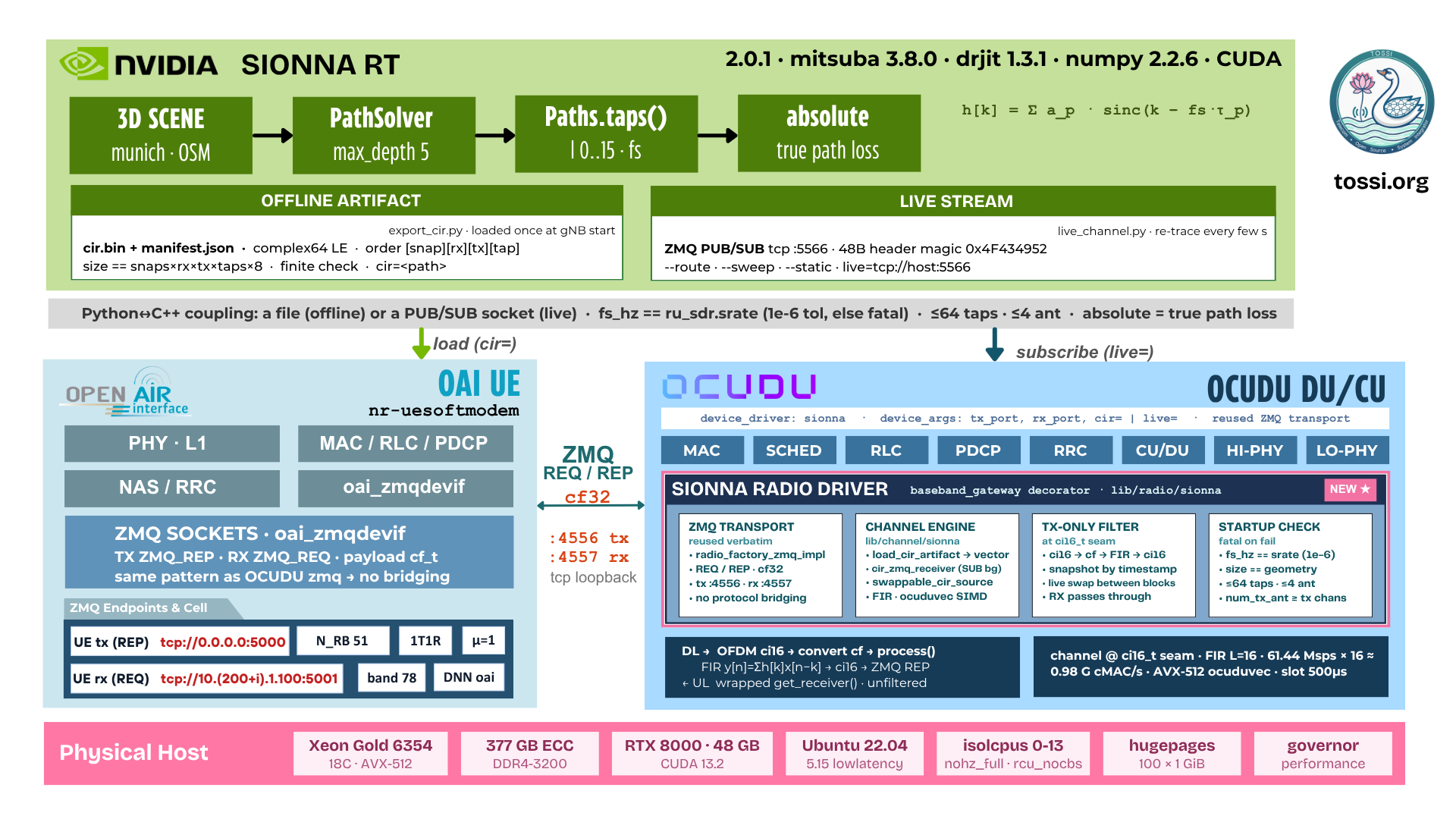
The sionna driver is a decorator around the existing ZMQ transport. It does not reimplement the socket handling; it wraps the transport and filters the transmitted samples before they are sent.
| Component | Path |
|---|---|
| CIR artifact loader | lib/channel/sionna/cir_artifact.cpp |
| Channel engine (FIR) | lib/channel/sionna/sionna_channel_engine.cpp |
| Live channel receiver | lib/channel/sionna/cir_zmq_receiver.cpp |
| Radio driver (factory, session, gateway) | lib/radio/sionna/ |
| Offline exporter | utils/sionna/export_cir.py |
| Live publisher | utils/sionna/live_channel.py |
| Route renderer (frames and video) | utils/sionna/render_route.py |
| Unit tests (22 tests) | tests/unittests/channel/sionna_channel_test.cpp |
| Configurations | configs/cu_sionna_zmq.yml, configs/du_sionna_n78_40mhz.yaml |
The driver is built together with the ZMQ driver and enabled automatically (ENABLE_SIONNA) whenever ZeroMQ is present, which is the default.
CIR Artifact Format
The offline artifact consists of a JSON manifest and a binary tap file:
{
  "format": "ocudu-sionna-cir",
  "version": 1,
  "scene": "sionna.rt.scene.munich",
  "fs_hz": 61440000.0,
  "snapshot_dt_s": 0.0,
  "num_snapshots": 1,
  "num_tx_ant": 1,
  "num_rx_ant": 1,
  "num_taps": 16,
  "normalization": "unit_energy",
  "loop": false,
  "data_file": "cir.bin"
}
cir.bin holds complex64 little-endian taps ordered [snapshot][rx_ant][tx_ant][tap]. The loader rejects an incorrect format or version, a missing field, a data file whose size does not match the declared geometry, non-finite taps, or values outside the supported ranges (up to 64 taps and 4 antennas per direction). The normalization field records whether the taps carry unit energy or the absolute path gain, so the driver applies the correct scaling rather than inferring it. This distinction is significant: unit-energy normalization holds SINR flat regardless of position, whereas absolute normalization, used by the live publisher, allows the RAN to react to distance and blockage.
Live Channel Wire Format
The live channel uses a 48-byte little-endian header followed by the taps as complex64:
| Field | Type | Notes |
|---|---|---|
magic | uint32 | 0x4F434952 |
version | uint32 | 1 |
sequence | uint32 | publisher counter |
num_snapshots | uint32 | |
num_tx_ant, num_rx_ant | uint32 | must not exceed 4 |
num_taps | uint32 | must not exceed 64 |
loop | uint32 | non-zero to restart the timeline |
fs_hz | double | must match the RU sampling rate |
snapshot_dt_s | double | zero for single-snapshot updates |
Updates that fail validation are discarded and counted; the previously applied channel remains in place, so a malformed publisher cannot disrupt a running RAN. Updates are applied between transmit blocks: the receive thread publishes through an atomic pointer swap, and the transmit path adopts the new channel on its next block, so the sample path is never blocked.
Deployment
Two repositories are cloned and compiled independently, then run together. Replace every path below with the location at which each repository is actually cloned; the paths shown are one example layout, not a requirement.
Prerequisites
sudo apt install libzmq3-dev cmake build-essential
DPDK is required by the OCUDU build (./build.sh enables it by default); if it is not already installed, follow OCUDU's DPDK setup instructions before building.
Installing Sionna RT
Sionna RT is installed as a Python package into an isolated virtual environment; it is neither cloned nor built from source. It provides the ray tracer only, with no PHY and no protocol stack, and runs entirely on the GPU through the Dr.Jit CUDA backend.
GPU Prerequisites
Sionna RT requires a CUDA-capable NVIDIA GPU and a working driver. It does not require a separately installed CUDA toolkit: the CUDA kernels ship inside the Mitsuba and Dr.Jit wheels and call the system NVIDIA driver directly. Verify the driver first:
nvidia-smi
The reference deployment used the following configuration:
| Item | Value |
|---|---|
| GPU | Quadro RTX 8000, 48 GB, Turing (compute capability 7.5) |
| NVIDIA driver | 595.45.04 (driver CUDA 13.2) |
| OS | Ubuntu 22.04.5 LTS |
| Python | 3.10.12 |
sionna-rt 2.0.1 requires Python 3.10 or newer, so the system Python 3.10 is sufficient; a newer Python is not required. VRAM is the binding constraint for large scenes and MIMO CIR batches. The 48 GB in the reference GPU is generous, but the built-in Munich scene used here runs comfortably in a few hundred megabytes.
Turing (7.5) or newer is recommended for hardware-accelerated ray tracing. The Dr.Jit CUDA wheel is forward-compatible with a newer driver than it was built against, which is why driver 595 and CUDA 13.2 work with a cu124-era stack.
Isolated Virtual Environment
python3.10 -m venv ~/sionna-rt-env
source ~/sionna-rt-env/bin/activate
python -m pip install --upgrade pip setuptools wheel
Installing the Ray Tracer
pip install sionna-rt
This pulls the full stack. The reference deployment resolved to:
sionna-rt   == 2.0.1
mitsuba     == 3.8.0
drjit       == 1.3.1
numpy       == 2.2.6
scipy       == 1.15.3
matplotlib  == 3.10.9
together with the Jupyter widget dependencies used by scene.preview(). No CUDA toolkit install step is required.
Verification
Stage 1: the Dr.Jit CUDA backend initializes on the GPU.
python -c "import drjit as dr; from drjit.cuda import Float; \
x=Float(1.,2.,3.); dr.eval(x*2.); print('Dr.Jit CUDA OK:', x*2.)"
Expected output: Dr.Jit CUDA OK: [2, 4, 6]. If import drjit.cuda fails, the GPU backend is unavailable and Sionna would silently fall back to the CPU; resolve the driver issue before continuing.
Stage 2: an end-to-end ray trace and CIR extraction.
python - <<'PY'
import sionna.rt as rt
from sionna.rt import load_scene, PathSolver, PlanarArray, Transmitter, Receiver
scene = load_scene(rt.scene.munich)
scene.tx_array = PlanarArray(num_rows=1, num_cols=1, pattern="iso", polarization="V")
scene.rx_array = PlanarArray(num_rows=1, num_cols=1, pattern="iso", polarization="V")
scene.add(Transmitter(name="tx", position=[8.5, 21, 27]))
scene.add(Receiver(name="rx", position=[45, 90, 1.5]))
paths = PathSolver()(scene, max_depth=5)
a, tau = paths.cir(out_type="numpy")
print("sionna.rt", rt.__version__, "| CIR amplitudes", a.shape, "| delays", tau.shape)
print("SUCCESS: GPU ray tracing + CIR generation working end to end")
PY
This loads the built-in Munich scene, places a transmitter and receiver, solves the paths, and extracts the CIR, which is the same amplitude and delay data the OCUDU channel consumes. The first scene load takes approximately 30 s; a subsequent re-trace takes approximately 40 ms.
Stage 3: confirm that the GPU is performing the work rather than falling back silently to the CPU. In a second terminal while stage 2 runs, or under any sustained trace:
nvidia-smi --query-gpu=utilization.gpu,memory.used --format=csv -l 1
Sustained Dr.Jit CUDA load shows the trace process at high GPU utilization; approximately 90 percent or more was measured on the RTX 8000.
Optional: PyTorch Interoperability
PyTorch is required only if gradients must flow between Sionna RT and a torch model. CIR generation feeding OCUDU does not use it.
pip install torch --index-url https://download.pytorch.org/whl/cu124
The cu124 wheel is forward-compatible with driver 595.
Operational Notes
drjit.detail.cuda_device_name()returnsNonein drjit 1.3.1. This is cosmetic; usenvidia-smito confirm the device, as in stage 3.- Mitsuba also exposes
llvm_ad_*(CPU) variants and auto-selects CUDA when a GPU is present. If a run is unexpectedly slow, confirm thatimport drjit.cudasucceeds; a failed import is the usual cause of a silent CPU fallback. - The virtual environment is reusable directly. Run
source ~/sionna-rt-env/bin/activatein any of the Sionna terminals below (the live publisher, the exporter, the route renderer, and the notebook).
Building OCUDU-RAN
git clone https://github.com/TOSSI-Foundation/OCUDU-RAN.git
cd OCUDU-RAN
git checkout dev

./build.sh
build.sh wraps cmake -DDU_SPLIT_TYPE=SPLIT_7_2 -DENABLE_DPDK=True -DASSERT_LEVEL=MINIMAL followed by make -j$(nproc). The Sionna driver is compiled in automatically whenever ZeroMQ is detected (ENABLE_SIONNA, on by default); no additional flag is required for it.
The binaries are produced at build/apps/cu/ocu and build/apps/du/odu.
Build the unit tests and confirm the channel engine is sound before proceeding:
cd build
make sionna_channel_test
./tests/unittests/channel/sionna_channel_test
All 22 tests are expected to pass.
Building the OAI UE
git clone https://github.com/TOSSI-Foundation/OAI-RAN.git
cd OAI-RAN
git checkout develop
Build the nrUE with the ZMQ radio device. Either of the following two approaches produces a working nr-uesoftmodem; adjust the cd to the actual clone location.
Option A: the build script.
cd OAI-RAN/cmake_targets
./build_oai --nrUE -w SIMU --ninja
Option B: manual CMake with the explicit ZMQ flag.
cd OAI-RAN/cmake_targets
rm -rf CMakeFiles CMakeCache.txt
cmake .. -DOAI_ZMQ=ON
cmake --build . --target nr-softmodem nr-uesoftmodem oai_zmqdevif rfsimulator -j$(nproc)
Both approaches must produce OAI_ZMQ=ON in the CMake cache; this is the ZMQ radio device (oai_zmqdevif) with which the OCUDU sionna and zmq drivers are wire-compatible. Confirm with:
grep OAI_ZMQ CMakeCache.txt
The resulting nr-uesoftmodem binary is used directly. A UE launch harness (multi_ue_sim/run_nue.sh) ships in the same OAI-RAN repository and expects the binary at <OAI-RAN clone>/cmake_targets/nr-uesoftmodem.
Running the Stack
Four terminals are used. Start the Sionna publisher before the DU so that the DU's live subscription finds a publisher already sending.
Terminal 1: Sionna live channel publisher.
source ~/sionna-rt-env/bin/activate
cd <OCUDU-RAN clone>

python -u utils/sionna/live_channel.py --bind tcp://127.0.0.1:5566 \
    --srate 61.44e6 --num-taps 16 \
    --route --steps 12 --loop-route --interval 3.0 \
    --tx-position 8.5 21 27 --rx-start 20 40 1.5 --rx-end 20 260 1.5 \
    --max-drop-db 35
Use python -u; without it the publisher buffers its output and appears to hang. Allow the scene to load (approximately 30 s), after which per-step lines appear:
[live] seq= 0 pos=(20,40) gain= -73.5dB applied=- 0.0dB paths=39 trace= 63ms
A synthetic alternative that requires no GPU, suitable for an initial connectivity check:
python -u utils/sionna/live_channel.py --bind tcp://127.0.0.1:5566 --sweep --interval 2
Terminal 2: CU.
cd <OCUDU-RAN clone>/build/apps
sudo taskset -c 1-2 ./cu/ocu -c <OCUDU-RAN clone>/configs/cu_sionna_zmq.yml
Confirm NGAP: sudo ss -np --sctp | grep :38412 should show ESTAB.
Terminal 3: DU.
cd <OCUDU-RAN clone>/build/apps
sudo OCUDU_INJECT_ENABLE=0 taskset -c 1-6 ./du/odu \
  -c <OCUDU-RAN clone>/configs/du_sionna_n78_40mhz.yaml
OCUDU_INJECT_ENABLE=0 disables this build's MAC/PHY latency injector, which otherwise defaults to on and injects 300 to 600 microseconds against a 500 microsecond slot, breaking FAPI timing. Wait for both of:
[RF] Sionna live channel: subscribed to 'tcp://127.0.0.1:5566'.
[DU-F1] F1 Setup: Procedure completed successfully.
Terminal 4: OAI UE.
cd <OAI-RAN clone>/multi_ue_sim
sudo N_RB=106 SD=16777215 UE_CPUS=7-20 bash run_nue.sh 1
N_RB=106 must match the DU's 40 MHz, 30 kHz-SCS cell configuration.
SD=16777215 (0xffffff, meaning no SD) is passed to the UE harness; update this and the other launch parameters to match your own deployment before running.
Verification
cd <OAI-RAN clone>/multi_ue_sim
sudo bash check_nue.sh 1
# want: sync/SIB1/RARok/RRCdone/RegAccept = 1, stage REGISTERED, IP 10.0.0.x

sudo ip netns exec ue1 ip -4 addr show oaitun_ue1
sudo ip netns exec ue1 ping -I oaitun_ue1 -c 6 8.8.8.8
The UE's tunnel resides inside the ue1 network namespace, so both the address check and the ping must run inside it with ip netns exec ue1.
To watch the RAN follow the live channel, place the publisher terminal and the following command side by side:
watch -n2 'sudo grep -aoE "SINR = [0-9-]+ dB, CQI = [0-9]+" \
  <OAI-RAN clone>/multi_ue_sim/logs/ue1_nue.log | tail -3'
As applied=-XX dB grows in the publisher's output, SINR falls; when the route reverses, SINR recovers.
Changing the Channel Without a Restart
Stop the publisher (Ctrl-C) and start a different one; the DU adopts it automatically.
# park the UE at a fixed spot
python -u utils/sionna/live_channel.py --bind tcp://127.0.0.1:5566 \
    --static --rx-start 20 40 1.5 --interval 2

# a different street
python -u utils/sionna/live_channel.py --bind tcp://127.0.0.1:5566 \
    --route --steps 20 --loop-route --rx-start 45 90 1.5 --rx-end 45 300 1.5
Visualization
Render the traced route as a sequence of frames and a video, independent of the running stack; this requires only the Sionna environment.
source ~/sionna-rt-env/bin/activate
cd <OCUDU-RAN clone>

python -u utils/sionna/render_route.py --out-dir artifacts/demo_video \
    --tx-position 8.5 21 27 --rx-start 20 40 1.5 --rx-end 20 300 1.5 \
    --steps 30 --resolution 1280 720 --num-samples 192 \
    --camera-position -180 120 200

ffmpeg -y -framerate 5 -i artifacts/demo_video/frame_%03d.png \
    -pix_fmt yuv420p -c:v libx264 -crf 20 artifacts/demo_video/route.mp4
utils/sionna/sionna_ocudu_demo.ipynb ships in the repository and presents, in a single notebook: the interactive 3D scene with ray paths, tap plots near and far from the transmitter, a path-gain-versus-position plot along the route, the rendered video, and a full-scene coverage map.
jupyter lab --no-browser --ip=0.0.0.0 --port=8888 --ServerApp.token='sionna'
# open utils/sionna/sionna_ocudu_demo.ipynb, Run All
Shutdown
cd <OAI-RAN clone>/multi_ue_sim && sudo bash run_nue.sh 1 --stop
sudo pkill -9 -x odu; sudo pkill -9 -x ocu
pkill -9 -f live_channel.py
Reference
Generating an Offline Artifact
To produce a startup artifact without the live socket:
source ~/sionna-rt-env/bin/activate
cd <OCUDU-RAN clone>
python utils/sionna/export_cir.py \
    --out-dir /tmp/cir_munich --srate 61.44e6 --num-taps 16 \
    --tx-position 8.5 21 27 --rx-start 45 90 1.5
For integration testing without ray tracing, --synthetic passthrough emits a unit impulse (output equal to input) and --synthetic two_tap emits a short echo profile. Set the artifact in the DU configuration:
ru_sdr:
  device_driver: sionna
  device_args: tx_port=tcp://127.0.0.1:4556,rx_port=tcp://127.0.0.1:4557,cir=/tmp/cir_munich/manifest.json
  srate: 61.44
cir= and live= can be combined: the artifact provides the startup channel and the socket replaces it as updates arrive. With live= alone, samples pass through unfiltered until the first update is accepted.
Operational Guidance
- Use
python -ufor every Python script here; otherwise stdout is buffered and the process appears to hang when it is not. - After any failure, restart the DU first and the UE second. Stale ZMQ state in the DU is the most common reason a UE fails to synchronize.
- Terminate stale UEs before starting a new one. Multiple
nr-uesoftmodemorzmq_proxy.pyprocesses deadlock the ZMQ path. OCUDU_INJECT_ENABLE=0is mandatory on this DU build (see Running the Stack).- The first Sionna scene load takes approximately 30 s; every subsequent trace takes approximately 40 ms.
Tests
cd <OCUDU-RAN clone>/build
make sionna_channel_test && ./tests/unittests/channel/sionna_channel_test
The suite covers passthrough and impulse responses, equivalence with a reference filter, block-splitting invariance, timestamp-gap handling, snapshot selection and looping, and the artifact loader's rejection paths, comprising 22 tests.
Measured Behaviour
Driving a receiver along a 220 m route in the built-in Munich scene, with live ray tracing, produces the following:
| Receiver position | Traced path gain | Reported SINR |
|---|---|---|
| 40 m | -73.5 dB | 77 |
| 120 m | -82.4 dB | 68 |
| 180 m | -97.3 dB | 53 |
| 240 m | -116 dB | 42 |
The RAN's reported SINR tracks the ray-traced path gain as the receiver moves, including a non-monotonic recovery around 200 m that corresponds to a building shadow in the scene geometry.
References
Sionna RT
- Documentation: nvlabs.github.io/sionna/rt
- Repository: github.com/NVlabs/sionna
- Package: pypi.org/project/sionna-rt
Engines
- Mitsuba 3: mitsuba.readthedocs.io
- Dr.Jit: drjit.readthedocs.io
TOSSI Foundation
- OCUDU-RAN: github.com/TOSSI-Foundation/OCUDU-RAN
- OAI-RAN: github.com/TOSSI-Foundation/OAI-RAN